Here is Part II of Barbara Katz's step-by step-directions about how to play games like Scrabble with family and friends. She picks up her discussion by telling you how to sign on at pogo.com.
How do I begin?
1. First, as with all sites, go via the web to www.pogo.com to the site portal.

You then register at the top of the screen for free. You do not have to become a member to play many, many games. (Membership, called Club Pogo, is something you can read about and consider at a later date. Its main attractions are the obliteration of annoying pop-up ads during games, double cash prizes, an even greater selection of games, and private club rooms. While I have never won a prize, there's always the hope of next time!)
2. Click on "Register" at the top of the screen. (The entire procedure is basic to most sites.)
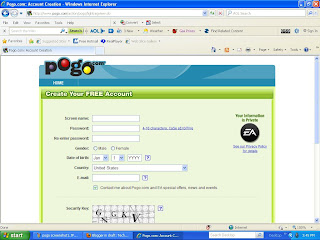
3. A new screen will prompt you to fill in the following:
Hi, (e.g. dancingqueen402)!
There you go! You are a gamer! Playtime has begun!
Imagine going into a casino resort area. First you pick which resort hotel, then which game room, then which table, then which seat. Online gaming is quite similar.
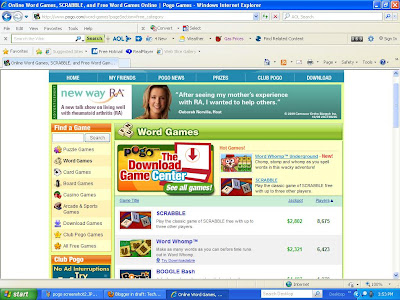
To get started looking around at your new playrooms, click “Start Playing” (as above). Always start at the top of the screen and look around. You will be guided to all types of free games, as well as games by type (card, board, puzzle, word, sports, arcade, etc). Just play around and check out all the drop-down menus to see what you'd like to play.
Try a Simple Start
I advise keeping it simple at first and focus on yourself, even though you may be joining a room with others inside. It is easier to grasp a little solitary play before trying to understand the whole site and explain it all to your friends and family with whom you'd like to play eventually.

Why not pick out a solitaire card game with which you are already familiar, just for practice? You will also see that you can choose to play within a set of rooms by your age range, via tabs above the lists of rooms for each particular game. The advantage: this usually provides age-appropriate game chat, which I have learned to appreciate! Pick a room that has some people in it, so that you can see how game-side chat works.
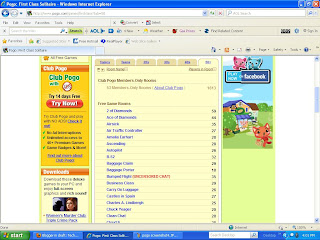
To review:
After you pick the game title, pick the age range, then click on a room. (In some games, you then pick a seat or table. Don’t worry about that right now.) It is that simple. The room will open up and the game board will be visible. (As with other sites, if you have a pop-up blocker you may have to hold down the control and shift keys to disable your pop-up blocker and allow the game board to open. Otherwise the game takes a few seconds to begin.) When your board appears, you will see your game-name (ID) on the right in a column of game-names, signifying the others in the room with you.
Fear not, there are instructions and help screens throughout the site and in each individual game.
Making friends
There's much more, but once you get the hang of it, it's easy to find out about playing more games, playing against computers, for badges, league play, special events, and more about membership. The information here should be enough to get you started and well on your way. Have a great time and I'll see you on pogo! I can’t wait to share the fun!
Barbara R. Katz
Barbara R. Katz spent decades of her career consulting with businesses in computer training, communication technology, and business services. Previously a writer in the publishing industry and for newsletters and special publications, she spends a great deal of time on various types of websites aside from gaming, including sales and marketing, research and social networking.
How do I begin?
1. First, as with all sites, go via the web to www.pogo.com to the site portal.

You then register at the top of the screen for free. You do not have to become a member to play many, many games. (Membership, called Club Pogo, is something you can read about and consider at a later date. Its main attractions are the obliteration of annoying pop-up ads during games, double cash prizes, an even greater selection of games, and private club rooms. While I have never won a prize, there's always the hope of next time!)
2. Click on "Register" at the top of the screen. (The entire procedure is basic to most sites.)

Your Gamer ID: Pick an anonymous "game-name” that may say something (but not too much) about you (e.g. dancingqueen402). If the name you want is already “taken” just change it slightly or come up with another that you think is original enough to be available. Remember, millions of people have chosen names before you!
Proceed with the rest of the fields on the registration page to:Create a password and fill out a few common details.
Take a moment to read the Terms and conditions, and agree to abide. Click continue.
4. You’re done! Next, you will receive the following message onscreen:Hi, (e.g. dancingqueen402)!
You’re signed up and ready to play games on Pogo.com™. We’ve even given you 10,000 tokens to help you get started!
When you're done exploring the site, be sure to check out these great Pogo.com games:
- Poppit!™
- First Class Solitaire
- YAHTZEE Party
There you go! You are a gamer! Playtime has begun!
Imagine going into a casino resort area. First you pick which resort hotel, then which game room, then which table, then which seat. Online gaming is quite similar.

Try a Simple Start
I advise keeping it simple at first and focus on yourself, even though you may be joining a room with others inside. It is easier to grasp a little solitary play before trying to understand the whole site and explain it all to your friends and family with whom you'd like to play eventually.


After you pick the game title, pick the age range, then click on a room. (In some games, you then pick a seat or table. Don’t worry about that right now.) It is that simple. The room will open up and the game board will be visible. (As with other sites, if you have a pop-up blocker you may have to hold down the control and shift keys to disable your pop-up blocker and allow the game board to open. Otherwise the game takes a few seconds to begin.) When your board appears, you will see your game-name (ID) on the right in a column of game-names, signifying the others in the room with you.
Fear not, there are instructions and help screens throughout the site and in each individual game.
Go ahead- play!
You can check out the rules and change the skill level. Start enjoying yourself in your chosen first game. Was that easy or what?
Chat:
If you want to, while you play, you can chat with other game players in the same room. Some may choose to chat, others may not. Give chat a try. I’ve made a lot of friends over the years just chatting here and there in the rooms. And if you have the desire, sometimes you have the perverse pleasure of being a fly on the wall viewing some interesting conversations without adding to them- LOL!
If at any time another player is annoying (called a flamer, when done on purpose), you can block him without stopping the rest of your chat. There is no need to confront him, which is often what a flamer is looking for!
Return to Play
You have now played a game you like. You can keep playing, or go back to the home page and try other games, or sign off until next time. You can come back anytime day or night, to the same room in the same game, or any other if you'd like. Sometimes a room fills up, particularly if a group of “friends” plays together all the time. Just choose another room. When you are done, just sign off.
A Bit More Advanced (i.e. Things to Deal with Later)
Your Optional Profile and Statistics
As described above, on the right side of the game board, you’ll see faces and “game-names.” See yours there? Right click on it and you can create a profile about yourself, regarding only basic personal details of your real life. I caution you to skip it or keep it simple, as this is a public domain and anonymity goes a long way towards protecting your privacy. When you right click, you’ll also see an option to check you game statistics. Since you don’t have any yet before playing, do that sometime in the future.
Making friends
If you plan to play with friends and family, add their game-names to your friends list. You’ll see a tab on the home page for it. After chatting up someone new for a day, a week, or longer that you would like to play or chat with again, right click on that person’s name while playing and add them to your friends list. Etiquette requires that you ask them first. Usually it will be mutual and you will both set up the “friendship.” Next time you come into the room, the chat section will tell you in red if your friend is there already! There is also a menu on the friends tab to see where your friends are anytime you come online, if they are at play. It’s a great way to find a game partner.
Setting up Favorite Games
On your homepage it's easy to indicate the games that become your favorites. There’s a tab that says edit favorites. It makes it easy to return to frequently played games again when you start your next session.
Finally, Playing with friends and family
Finally, Playing with friends and family
You can tell anyone you know what game you are going to play, when, and in what age-range and room, and they can join you if there is space available. That holds true for games without small tables. There is usually space for dozens of people, so your whole family and all your friends could even get together at once! Just send them an IM or email with the details. Those who know your player ID can just check the Friends List to find you.
Setting up Scrabble to play with friends and family only!
Setting up Scrabble to play with friends and family only!
Scrabble is an example of a game that only allows a certain number of seats at a table (4) and works a bit differently from other games. Let’s say you feel ready to go play Scrabble with members of the family. Let them know in advance so that you can schedule a game. Forward them this blog for good measure.
Once again, choose game, age range, room, but instead of the game appearing here, you'll find and option for tables. You'll need to find an empty available table and the easiest way to do that is to click to arrange the tables by availability. Once you find an available table, click on PLAY. You will then be asked to set up preferences for your table. Remember to select "PRIVATE" so you can allow only your friends or family to join when they come online. You can set up all kinds of parameters for game play in a pop-up screen. You might choose to play with or without hints or dictionary, longer or shorter turn length, etc. These options can be changed for future games if your table rules need adjusting.
It's time to recontact the other members of your party, to tell them the game (Scrabble), the age range, the room number or name (Temporary Room 143 or Disabled Angels, for example) and table number. There is one more crucial piece of information to pass along for shared, planned game play: a password. The person initiating the game sets it. The password will need to be input by each player trying to sit down at the table or they will not be able to get in the game. This keeps others from joining your game. Include all this information in your text, email, IM or actually call your family to begin your game in few minutes. Have fun! There is always lots of online help from both pogo and other players, so no worries!
There's much more, but once you get the hang of it, it's easy to find out about playing more games, playing against computers, for badges, league play, special events, and more about membership. The information here should be enough to get you started and well on your way. Have a great time and I'll see you on pogo! I can’t wait to share the fun!
Barbara R. Katz
Barbara R. Katz spent decades of her career consulting with businesses in computer training, communication technology, and business services. Previously a writer in the publishing industry and for newsletters and special publications, she spends a great deal of time on various types of websites aside from gaming, including sales and marketing, research and social networking.

