Showing posts with label ATT. Show all posts

Wednesday, March 23, 2011

When Buying Mobile Devices, Buy the Network First

This week AT&T announced that it was purchasing T-Mobile USA for $39 billion. Whether or not this acquisition goes through, it brought up an issue for me. I’ve been spending my time telling Baby Boomers how to use their iPhones and iPads. What I haven’t addressed is the importance of the network in your enjoyment of these items. It's important to have strong signals and a stable network to power the devices you use. Otherwise, they don't operate well, and you won't like them.

The importance of the network hit home for me last Friday night. I was in Manhattan and meeting my husband and some friends for dinner. I was sitting comfortably at the table waiting for them to arrive. When ten minutes went by, I decided to call, first my husband, then my friends. The first thing that happened is that I couldn’t get a signal at the table where I was seated and there was no Wi-Fi available to use. In a lot of places I have free Wi-Fi through Optimum Online, but not in this particular part of New York.

I left the table to go outside the restaurant to make the call.  There, my phone read that I had a signal, but two attempts at calling my husband ended up not going through. A third call went directly to voice mail. A forth call got a busy signal. I know my husband wasn’t on the phone at this time. A call to my friends also dropped and another went direct to voice mail. I tried sending a text, but that didn’t go through either.

Next, I tried sending an email, hoping that the data network was better than the voice network.  You could see the symbol in the left corner of the phone, indicating that the phone was trying to catch a signal to send the email.  That email was never completed. The culprit was AT&T’s network in NYC, which has been the subject of many complaints. 
This is what my signal indicator looks like. The star shape shows the phone looking for a signal. This was taken inside my house where I have Wi-Fi and a strong AT&T signal (bars)

AT&T is aware of its problems in NYC and continues to upgrade its systems there. Articles have been written about people who carry two phones in NYC, one for voice calls and another for data. However, this doesn’t help you when you are stuck without cell phone service at a crucial time. Luckily, being late for dinner doesn’t qualify as crucial. However when you’ve spent hundreds of dollars on an iPhone or iPad, and you’ve gotten a data plan, you want it to work when you want it to work.

As you know, if the network is a problem you can’t take advantage of all the cool aspects of many of the apps I’ve been talking about in this column. Most of them rely on consumers being able to access a good signal, whether data or voice. Wi-Fi, while available now more than ever,  isn’t always available to help you. Another problem: if you don’t have a strong network signal, your phone keeps trying and trying to download your email etc., using up your battery life.

So here’s the thing.  You all know I’m an iPhone aficionado. I could have switched to Verizon for better service in NYC when Verizon announced they would carry the iPhone. I didn’t, and here is why: my house is in New Jersey and when in the past I used Verizon, I was unable to use my cell phone in my house because Verizon doesn’t have a tower nearby. AT&T, on the other hand, does have a tower nearby and I can use my AT&T phone easily in my house. I know that this problem hasn’t been overcome over the years because visitors to my house who have Verizon experience the same problem. Visitors with Sprint often find their batteries depleted as their phones continuously search for a signal.  

So I’ve chosen to have cell service at home over cell service in NYC.  You too will have to make similar choices. Choose the service that works best for you as an individual or your family as a whole.  Then decide on the tablet or smart phone that is right for you.

 If the regulators let AT&T purchase T-Mobile it will be good for some consumers and bad for others. AT&T users will have more coverage in places like NYC where cell signals are a problem. T-Mobile users will probably lose out on pricing. We will all lose out on choices.  The bottom line remains, when buying your iPhone or any other mobile device, always buy the network first. Of course, as in my case, that doesn't always work out.

Thursday, March 10, 2011

How Much iPad2 Do You Need, Boomers?

The March 11 release date for the new iPad2 is right around the corner, but I am not going to buy one, at least not yet. The reason is simple. Despite all the improvements Apple has made to the iPad, I’m still figuring out my first generation iPad. 

Like many Boomers, it takes me a while to explore new technology. My iPad still “magical” to me and delivers more entertainment and utility than one device ought to. I know I’ve groused about some of the iPad’s shortcomings, but mostly, it is a terrific device.

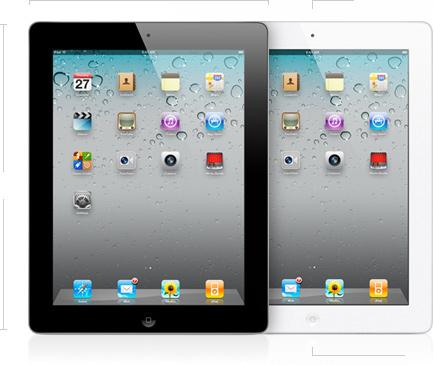
This blog post, however, is for those of you who are going to run out and buy the iPad2, pictured above, on March 11. I know there is pent up demand for these devices. A lot of people waited to buy, wanting to see if the tablet phenomenon was real or if people got tired of the iPad easily.

Recently a friend emailed me trying to figure out just how much storage she was going to need on her new iPad when she got one.  I couldn’t tell her for sure, but judging by my use, going the middle road was a safe bet.  When I bought my iPad I bought it with Wi-Fi and 3G and 32G of storage. I thought I would easily fill it up.

The truth is I haven’t come close. Most of the apps I use just don’t hog the iPad’s space. What takes up a lot of space are my pictures, but even with all of my pictures, all of my music and a few videos, I have plenty of space left.

Here are your options for the iPad2:

iPad2 With Wi-Fi : 16GB $499, 32GB $599, 64GB $699
iPad2 With Wi-Fi and 3G (your choice Verizon or AT&T): 16GB $629, 32GB $729, 64GB $829

It’s easy to overbuy when you are looking at the latest and greatest thing. To prevent this, I’d say, take a look at your computer. If you are the kind of person who runs out of storage on your computer and has to frequently upgrade or offload to a storage drive, then you’ll be the kind of person who quickly fills up the iPad.

If you are a modest computer user, you’ll be a modest iPad user too. What’s nice about the iPad is that if you are wrong, and you do fill it up, you can just select to put only a portion of your music or TV shows on the device, and the rest will stay on your PC or Mac. 

A  post on the Fortune website by Philip Elmer-Dewitt is a very good resource for people who are trying to figure out if they will get Wi-Fi only or 3G enabled versions, or if they will attempt to use the device as a Wi-Fi hotspot tethered to their phone.

Basically, the 3G works for commuters who want to make sure they can access their email on the iPad during their daily commute. It is also very good for those who take their iPads on the road with them and use them as laptop substitutes. And the 3G version of the iPad comes with GPS, something that is not on the Wi-Fi only version. So if you are planning to use your iPad as a navigation device, you might consider springing for the 3G version.

To make things more confusing, Apple will soon allow users to “tether’ their iPads to their iPhones if they use AT&T. That will make the iPhone a personal hotspot for your Wi-Fi only iPad2. You download your data through your phone to your iPad, in the same way you use a Wi-Fi hotspot.

This service costs $20/month, but has the advantage of letting you buy 3G service on an “as needed” basis. I don’t think many Boomers will be interested in the hotspot offering because setting it up each time you want to use it has been described as a painful experience by some who have tried. 

I hope this post has been some help to those who plan to buy the iPad2 March 11 and thereafter. Good luck and enjoy!

Sunday, May 2, 2010

How does that iPhone App Open that Trunk?

I was watching a little TV one day when an ad came on for the Apple iPhone. If you've been reading this blog, you know I love my iPhone and like to search out new and useful apps. The one app that caught my eye this week was in the commercial called "Family Man". You can see the commercial I'm talking about here. Clearly, it shows a man, using his iPhone, to open the trunk of his car. Well, my question was "how did he do that?"

The key to this action is an app called Viper developed by a company called Directed, which does a lot of things: start your car, open your trunk, lock and unlock your car etc. Very cool, right?


However, all the stars have to be aligned correctly. First, you need a car that is "compatible" with the device. Then you have to buy a hardware device for $299 from Best Buy and install it in your car. (Installation is another charge. On the Apple Web Site, a reviewer said it cost him $199 to get the device installed.) If you don't have a compatible car, you can get the functionality through a "complete smart start system," which costs in the neighborhood of $500.

After you've chosen which device you need, you can use the "free" Viper SmartStart App to unlock your car, start it remotely on cold days,  trigger the panic alarm etc. Oh, yes, after the first year there is a yearly charge of $29.99 for the privilege of using a 3G network to pop the trunk on your car.


Is it worth it? You'll have to decide. You can activate the system from anywhere, so I can imagine that people who travel often and worry they didn't lock the car might go for it.  There is a security advantage. If someone steals your car, you can activate a "kill switch" and  as soon as they hit the breaks, the car shuts off. You also have to realize that this app is only as good as the network. AT&T has some problems in some areas, and it might not be worthwhile to install this app where you know the network gets overloaded and drops calls.

The bottom line, Boomers. Viper is cool, for sure, but also pricey. The company says it also has modules that are compatible with Blackberries. I'm holding off on this one. It's just not worth it to me.

Viper has a good demo of its system at this website.

Thursday, March 18, 2010

"Tour Guide in Your Pocket?" Take a look at HearPlanet, Boomers

Boomers who travel often want to save some money and I just ran across a great little application for the iPhone that will help you do that. It's an app called HearPlanet that replaces travel guides, and it was recommended in a list of best iPhone apps by National Geographic Adventure Magazine. 

The other apps in this list are interesting, but National Geographic writer Steve Casimiro says this application is like "having a tour guide in your pocket." The app "tells you what attractions are nearby and then plays the Wikipedia description aloud."  There is a free version and one priced at $4.99. Even if you splurge for the $4.99 version, it could save boomers a lot of money buying guide books at the various sites they visit.


The beauty of HearPlanet is that it uses geolocation technology. You don't have to type in where you are.  You just press a button on the far left on the bottom of the Featured Places screen, and the application finds where you are and recommends places near you.


One reviewer in an AAA magazine said "The drive took us past Casa Grande, the site of ancient American Indian ruins. To learn about them, Janice searched HearPlanet  ($4.99), a talking guidebook that uses your location to find Wikipedia articles about nearby sights. It gave us an instant overview of Casa Grande."

I downloaded the free version of HearPlanet, and I found it was an amazing tool. Here's what the app came up with around my house.


I live in a residential area of New Jersey, but I found an entry for the nearby commuter airport.  The entry gave a detailed history of the airport and even mentioned that the airport gained notoriety when John F. Kennedy, Jr. took off from there on his ill-fated last flight.

The only problem with the Free version seems to be that it continuously asks you to upgrade to the complete version which has interactive maps.

Reviewers of the upgraded version are sometimes frustrated by the lack of a signal in the places they are visiting, but that is problem with the AT&T network and not the program. Still it would be better if you could download some of the info ahead of time, just in case the signal couldn't be found.

The free version doesn't recommend restaurants or tell you the best places to stay, so I'm sure one of the more traditional travel guides will still be required. Still this is a great little application that could help you discover new places to go and see.