Showing posts with label App Store. Show all posts

Thursday, January 27, 2011

I Bet You'll Be Paying for Coffee From Your Phone, Boomers

Just a brief note to my loyal readers. I'm sorry I've not posted for a while. I'm getting back in the saddle now, and hope to keep this blog updated on a more regular basis. Thank you for your indulgence.

About a week ago,  I heard that Starbucks was going to release an app for the iPhone that will allow people to pay for their Skinny Caramel Macchiatos with their phones. The more I thought about it, the more I wanted to tell you about it. Baby Boomers are big coffee drinkers and many of us need our fix every morning. Some of us absolutely pay top dollar for our designer coffee. I'm not the only Baby Boomer in line at my local Starbucks and my husband waits in line every day in NYC for his fix of java.

One question always has been: "How can Starbucks make that line move faster?" Well, I think Starbucks actually has hit on something that will make the line move faster! Also, I think what they are doing will make it more likely that our generation will trust paying for goods and services with our phone.

Now, I've heard about elaborate schemes that let people use their phones as credit cards before, but they all required either another piece of hardware hooked up to the phone or some other elaborate effort ---which I don't think people are going to actually do.  One "pilot program" I read about, is described in this Reuters article:
The program will allow select New York-area employees and customers to install small chips, supplied by Visa and its technology vendors, in their smartphones that emit radio signals over very short distances.

Customers would then "bump" their phones with point-of-sale devices in stores -- actually they need only wave the phones near the devices -- and their bank account data would be collected and their purchases completed.
Frankly, people in Japan have been using their phones for years as a mobile wallet, but in the case of Japan, I believe the phone company takes the charges and collects the money on the bill.  Here, credit card companies and banks want to be involved. But the Starbucks solution is perfect for small purchases. And people usually will use their credit cards to "buy" the gift card that is being used.

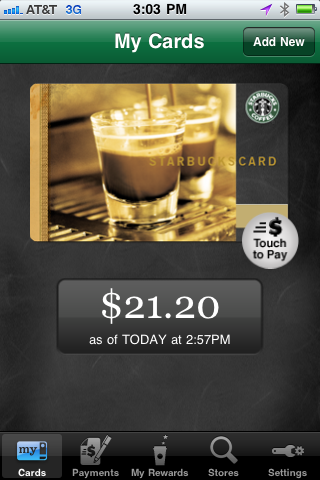
First, download the Starbucks Card Mobile App from the App Store, then buy a Starbucks gift card or "stored value" card from your local Starbucks. You can even buy one online and have it emailed to yourself, but to test this app out I bought a card for $25.00.

The app prompts you to enter the card number and a passcode, which is scratched off from the gift card. After you've entered those numbers, you've registered your card.


You don't have to do anything else to register your card, but if you wish to accumulate points and to qualify for a free birthday drink, you can register for the Starbuck's loyalty program as in the screen above. You can also reload your card online at Starbuck's website:


Today I took my phone out to my local Starbucks for a test run. After ordering my 140 calorie Skinny Caramel Macchiato, I touched the portion of the card below that says "Touch to Pay" then handed my phone to the cashier to scan the bar code that appeared. For obvious reasons, I've changed the bar code picture below.
After the cashier was finished I touched the button that said "Touch When Done", and my purchase registered on my phone. I liked using the app because there was no fumbling in my purse for my credit card or for cash, no change to worry about, no signing, no making sure that my credit card got back into my wallet.

Simply put it was quick and easy, and I think it will be the future --how all of us will pay for small items. I definitely think Starbucks will be the merchant to make mobile payments accessible even to those of us who reject such notions. And I think that this is one technology that baby boomers will readily adopt.

Wednesday, August 25, 2010

Boomers Will Like the Interactive RollingStone 500 Greatest Song Issue

In my last blog post, I talked about RollingStone Magazine's interactive issue, which users can download for the iPad through the Zinio app. What sets this magazine apart is the clever way it is designed to take advantage of the interactive features of the iPad. Here's how you get it. First download the free Zinio App from the App store. When you open the Zinio App, you'll find a "store" inside. Inside the store, there is a listing for interactive magazines. Choose the RollingStone 500 Greatest Songs of All Times Issue.


You'll have to give Zinio a credit card number to get this app, but once you download it and pay the $9.99, a  hefty price for an app, you get a magazine chock full of information. There are a couple of feature stories such as this interview with Leiber and Stoller,


and short articles about each of the songs and artists chosen, as well as a way to listen to 30 seconds of each song.

 
The number one designated song in the magazine is  Like a Rolling Stone by Bob Dylan, and next to it are icons for reading about it, listening to 30 seconds of it, and buying it.


In fact, many of the top 500 songs will be familiar to Baby Boomers and come from artists we know and love like the Beatles, John Lennon , The Rolling Stones, Elvis Presley and The Beach Boys. The app easy to use and fun to listen to.

What's significant about the magazine is the spirit of discovery that it encourages. You are only wasting 30 seconds of your time if you tap on an unfamiliar song and don't like it, so you keep on tapping. That's when I found out that all hip hop wasn't created equal. Number 51 on the list, right next to The Tracks of My Tears by Smokey Robinson, was The Message by Grandmaster Flash and the Furious Five. I listened to 30 seconds of it and I liked it. If I choose to download it, it will be the first hip hop song ever on my iPod and iPad. And that's exactly what Apple, Zinio, and RollingStone are counting on.

Going through these 500 songs will be a journey of discovery for many of us. If you are like me, you missed some of the songs of the 80s and 90s. By that time I had ventured into Jazz and other venues. But I am open to all kinds of music. So if I find something I like in this journey, I'll probably buy it from the iTunes store, which is conveniently linked to the app. You do have to re-sign in to the iTunes store to purchase the songs, but actually, it's genius. Once again Apple has found a way to part me from my money! I'd definitely like to know how many songs were processed through the iTunes store from people who bought the RollingStone magazine. I'll bet it's impressive!

Friday, August 6, 2010

Download those Magazines Boomers!

If you have an iPad, you may want to download some of the newest e-magazines that were designed just for this platform. Or you can get replicas of current magazines and read them in the iPad's format. Since the iPad is a beautiful venue for looking at pictures, magazine art stands out on the device.

Prior to a recent trip to the West Coast I loaded my iPad with a few e-magazines to see how I would enjoy them. Well, I did enjoy them, but I was unable to enjoy most of them on the airplane! Almost every e-magazine I tried had a downloadable or interactive component. That means that the same thing that keeps these magazines interesting, keeps people from reading them on an airplane where you can't turn on your cellular service during flight!  I learned a real world lesson about how e-magazines work on today's iPad.

As I said in a recent post, I do have a beef with Apple. Magazines need a category of their own in the App store. Not all of the magazines available come up if you plug in the keyword "Magazine" into the search engine. I understand that Apple and magazine publishers are feuding about subscriptions on the iPad. Magazine publishers want to offer them, but Apple just wants people to download each individual issue and pay the price. Maybe that's why Apple is being so user "unfriendly" about magazines on its site.


Anyway, I did manage to download some of the magazines now available and I also downloaded magazines from two what I call "gateway apps": Magcloud and Zinio. Magcloud and Zinio are magazine stands of sorts, and let you download issues, most for a price, although a number of beautiful magazines like some Life Magazine titles are free.

In a very interesting move, Rolling Stone just put out a $9.99 special issue through Zinio on the iPad that includes articles, but also plays 30 seconds of each and every of the "500 Greatest Songs of All Time."  You can also download the complete songs, for a price, if there is something you want to play on your iPad. I plan to download the magazine, and report back to you next time on how I liked it. Of course, this is a very clever, yet entertaining, way to part people from their money, since once you hear 30 seconds of those songs, you are probably going to buy them if you don't have them.

That being said, some magazine publishers have gone their own way and are issuing individual apps for the iPad. Here is an example of the app for the sample issue of Sports Illustrated and a screen shot of two of its pages, including one that tells you how to navigate through the app. I've also pasted a screen shot from the cover of the Vanity Fair app.


When I was reading through reviews at the app store, some subscribers to Glamour's free iPad app were  disappointed that once they downloaded the app, they had to pay for the actual e-magazine. And some subscribers to the print version were upset they they were being asked to pay twice for the same information.

If you do decide to give downloading magazines a try, let me know what you think both about the e-magazines you've read and what you think about the issues brought up by reviewers. If you have a subscription to the print magazine, should you have to pay for the iPad version?

Sunday, May 23, 2010

Cooking Allergy Free--An App for That

A couple of years ago I joined a group of women who play Mahjong. We meet every week, and someone cooks dinner. We eat and laugh, and then we play. We decided to cook dinner because everyone was eating too many snacks during the course of the night, and we wanted to be healthy.


However, after two years, cooking dinner is a bit of a challenge. Some members of our group don't like certain food items like soup or even Brussel sprouts. Everyone is on a diet at one time or another and can't have carbs, fat, sugar, or something else! And others have food allergies. I think that food allergies, sensitivities, and auto-immune diseases like Celiac, have become more prominent in our Boomer generation. They are more easily diagnosed, so more people know they have them.


A recent entry to the iPhone App family called "Cook it, Allergy Free" was developed by Kim Maes, who is getting her masters degree in nutrition. Kim wanted to help people who want to cook taking allergies into consideration.  I like this app. The recipes look good and easy to follow and the amount of information given is amazing. Unlike many of the apps I've reviewed here, this one isn't free. It costs $4.99. If I make a number of the recipes and it helps me deal with the food allergy problems of my friends, then it will definitely be worth it.


When you first open the app you are greeted by a list of food types: Appetizers, Breads, Breakfast, Vegetables, Main dishes etc.


I decided to tap the Main Dishes tab, and I found that further broken down to Chicken, Beef, Pork and Seafood. Since chicken is a dish everyone will eat, I took a look at the chicken dishes.


The first one was Apricot Chicken with Almonds, which looked like a good prospect.


But what was I going to do about those pesky Almonds? One of my group can't eat them. Should I leave them out?  Well, this app provides a great list of items that can be substituted for almonds in this recipe. I'll pick one of those.


The app also has a way to create a grocery list for the ingredients, and can place the list by grocery isle, making picking up the ingredients easy. I don't know about you, but after all these years of grocery shopping for my family, I'm getting tired of it. Anything that makes it easier is appreciated.


If I were to have one criticism of this app is that I wish the nutritional information had been included. I'd like to know how many calories are in a serving, how much fat etc. Someone in my group is always on a diet and would like to know. However, in general, I'd say this is a good way to find new recipes and still accommodate dietary difficulties. I'm glad to have it and I thank the developers. For more information and additional recipes, check out the blog and website at Cook It Allergy Free.


Tuesday, November 17, 2009

Birthday memories

Well, today is my daughter's birthday. Well, actually it was yesterday where she is in New Zealand. So while today on the Eastern seaboard is her birthday, it was yesterday in New Zealand. Is it any wonder that I'm confused?

I often forget birthdays and have for many years, as my extended family will attest. However, some boomers I've been talking to seem to be having problems with this for the first time. That is they are becoming forgetful for the first time in their lives. I think they are lucky.

Nevertheless,  I decided to look at the iPhone App store to see if there were any handy apps that could help boomers remember birthdays and avoid family fights. I did find a free one from a company called From|Ahead, simply called Birthdays.

The simple program provides lots of options. If you are a Facebook user, you can import the birthdays of your friends from there. You can get birthdays from your calendar or from an address book. Or, you can simply type them in to the program.

The program will notify you by email  if you want, or notify you via your iPhone. And you can choose how frequently you want to be reminded. Daily? Monthly? Weekly?

I think this little app is beautiful, clever and useful and is the kind of thing many boomers will appreciate. If my sister is reading this, here's the truth. I may still forget birthdays, but it will because I ignored the notifications this app sends.  I will be sorry, as always. I promise.