Showing posts with label Twitter. Show all posts

Saturday, June 16, 2012

When Social Media Sites Go Away


I’m just now mourning the loss of EONs, the social media site aimed at Baby Boomers. I didn’t use it all that much, but I loved the groups that talked about the iPhone and the iPad. The people my age and older using those devices were so knowledgeable and so willing to share their advice that I felt that no question was too irrelevant or just plain dumb. 

And some of them were using their iPads for very sophisticated things that I could never replicate. One of the members of the group always put up great videos he edited on the iPad. Another talked about how he used the device for many business applications.

 And one of the members of the group gave me a gift by letting Tech and the Baby Boomer use the story of her mother, severely impacted by arthritis, who could touch the iPad with her knuckles to tap out emails to her family and also to view photos from grandchildren. As you can see, these people made a real impact on me. 

So my question now is where did they go? Where are you OldMike? Louscraps? Techie44? SkeeterThompson1? LBretired? Where did all the posts go? Where are those great discussions? And the photos? I know many of the members of this group uploaded photos and videos to the site. If they were smart, they kept copies.

Officially Lori Bitter of Continuum Crew, who purchased Eons a few months ago, blamed the problem on the company’s service provider. This is what was posted on the Facebook page for the group in early May:

To our Eons members,

We know many you have all been waiting patiently for news on the future of the site. As a team, we have been working to resolve the business issues with our service provider. We have negotiated in good faith to restore the site and move forward. Unfortunately our provider is demanding a financial commitment that we cannot make at this time. We are at an impasse. While we have worked behind the scenes to try to come up with an alternative to get the site restored, none of those have worked out either. For the foreseeable future, the site will remain down.

As Matt stated before, there is no reason to worry about your personal data; it is secure. We will continue to pursue all avenues available to bring Eons back.

Also, the company Crew Media in Texas is in no way affiliated with Crew Media who owns Eons. Please stop the calls to their president immediately, as there is nothing he can do.

Thank you,
Lori and the Eons Team

If you are “into” social media, and that includes Facebook, the people on the sites become if not friends, then people you are looking forward to hearing from. You enjoy their discussions. You like what they have to say. 

Perhaps you’ve gotten involved on a gaming site where the same people play the games you like, and you’ve grown to enjoy playing with them. Or perhaps you like to talk about golf or baseball. In social media, the people who have similar interests to you become closer to you than you realize.

That is: you become close to them until the server is shut down, and all their conversations, past and those you might have had in the future, are unreachable.

For me, this brings up a larger question. What if Facebook went away? What if they closed in the middle of the night with no way for you to retrieve your Timeline? Or see your old status updates? How would all the millions of you who spend time on it day after day feel?
 
They say that nothing really goes away on the Internet. Somewhere in cyberspace those discussions about the iPad and iPhone will exist. Yet finding them will not be easy. So Lori, if you are reading this, and EONs doesn’t return, please at least make your archives accessible in some way and provide a way for the people who liked to hang out on your site to find each other.
 
Enhanced by Zemanta

Friday, June 25, 2010

Updating to iPhone OS4---It's Really Not that Intuitive, Boomers

Sorry I haven't been posting regularly, but life has a way of getting in the way. And sometimes, even the gadgets you rely on to simplify your life, seem to be complicating it.

So it was for me this week, when Apple announced its upgrade to the OS4, and I couldn't even figure out how to download  the operating system onto my phone. My original iPhone was a 3GS, and I expected that when I synced to iTunes I would get a message telling me about the new OS and that I should upgrade my phone. Well that didn't happen.

When I complained to family about not being able to find the upgrade on the Apple site, my son took over and actually upgraded my phone for me, before I had a chance to look at all the steps it took. I made him show me what he did so I could blog about it.

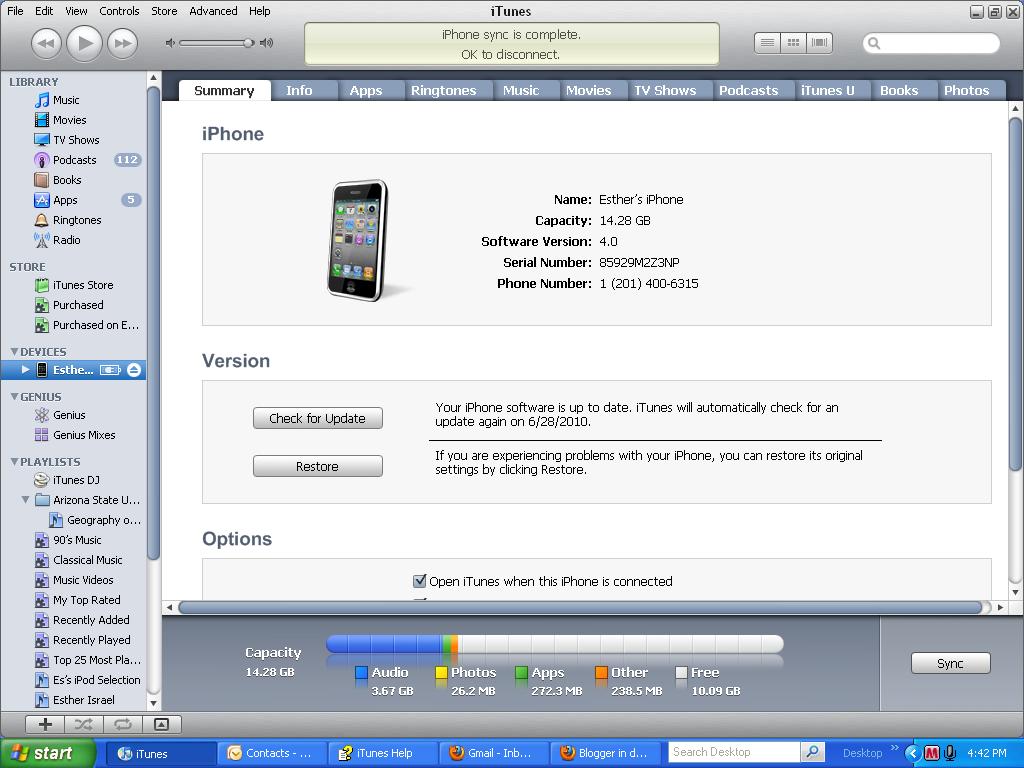
Of course I found out that all you have to do is connect your device to iTunes, sync it, click on the little icon of the iPhone that appears under "Devices", and it will say "Check for Updates."


After you click, it will give you options to update your phone. My question for Apple is, why isn't this automatic? Shouldn't they notify you when an update is available? All my other programs do. Maybe there is something I'm missing here, like a setting I'm not seeing to set it to notify me right away when an update is available. Or maybe there  is a reason some people don't want to automatically upgrade to a new operating system when it comes out. Too many bugs, perhaps?

Anyway, once I updated the phone, I began exploring some of the new capabilities, and frankly, they just didn't seem so revolutionary to me. Yes, I got some spiffy new backgrounds for my phone. And I learned that if you double click on the home button you can keep some apps running while you go to another app. I can keep my mail open while I play a game, for example. That's good, and saves some steps. But is it revolutionary? Not really.

One thing I did like was that I was able to organize all my apps in folders, which significantly reduced the number of pages I have to deal with on my phone screen. All my social apps such as Facebook and Twitter are in a folder, as are all my music apps.


My son moved some of the apps together right on the phone screen, but when I tried to do this myself, I couldn't do it. However, following a tip from an EONs member, I decided to go into Apple iTunes, connect my iPhone, click on my iPhone icon which is under the Devices section, and click the tab called Apps. Then I was able to use my mouse to drag the apps icons to consolidate apps into appropriate folders.  Now I have two pages of icons rather than three, and am happy with the results.

This is how iTunes Help tells you how to do it:


I have to tell you that doing this wasn't intuitive or as easy as I expected from Apple. However, now that I've done it once, it seems easy in retrospect. At least, since Apple does things consistently, I'll know how to change my new iPad when the operating system update to that comes along in the fall.

My son, who has been helping me figure these things out, says he can't relate to my difficulties, and he is laughing at me a little today as he reads this post.  But  I'm guessing the rest of you can relate to me, right?

Tuesday, June 15, 2010

Ever Hear of Location-based Services, Boomers? How about Foursquare?

Recently I read a post by a marketer who believes that Boomers increasingly will be using location-based services. In case you don't know what these are, I'll try my best to explain. Your cell phone probably has GPS in it, the same kind of GPS that gives you directions in the car. With many cell phones, especially smart phones, you can download geolocation apps such as Foursquare. Foursquare lets you "check in" when you are at a particular location, such as a concert, or even a department store or Starbucks. "Checking in" means letting all of your contacts know where you are at that particular moment, and also letting the establishment know that you are there.


When I first heard about this, I thought, why would anyone want to let people know where they are? That's fine for kids who have time to hang out together and want to find their friends, but why would I do it? Well apparently, according to blogger  Anne Mai Bertelsen, president of  MAI Strategies, Boomers, me included, are going to want to do this for many reasons.

First of all, I'll be able to keep track of all the places I've been. Ever wonder what the name of that great restaurant you went to in San Francisco was? Or where you saw that piece of jewelry you just couldn't decide whether you wanted or not? If you "check in" at the places you go you'll be able to track that information. You'll have a memory jogger, something Boomers can surely use.

Also, I'll be rewarded when I "check in" frequently at one place. So my 5th trip to Starbucks or my 3rd trip to an expensive restaurant will reap some kind of recognition. Perhaps a dollar off a Frappuccino will be in my future, Bertelson says. Or maybe I'll get a free desert at the restaurant.

One of the geo-location apps -- Loopt --that can be downloaded onto a smart phone is a sort of virtual loyalty program. I use my loyalty card to get discounts at the Shoprite near my home. Why wouldn't I want to use a virtual loyalty program? Discounts, without having to clip coupons, are something Boomers can easily understand. Below you'll see what the Loopt iPhone app looks like.


Bertelson says that one of the reasons she uses the services is that her friends use it. When they go to a restaurant they post what they liked eating there, for example. I suppose they also will post what to avoid. Then when she goes to that same restaurant and checks in, she finds recommendations from her own friends. That's kind of cool.

A working woman, Betelson says she is also able to use the services to find colleagues at conferences. Occasionally, she's even been able to locate relatives who happen to be in the same place she is at the same time. Here's how it would work. You are visiting a crowded craft fair and unbeknown to you Cousin Mary is wandering around the same craft fair. Odds are you won't meet. However, if you've both "checked in" to the craft fair, you'll know that Mary is there, and you'll be able to contact her and find her.

There are lots of other location based apps for the iPhone, for Twitter and even for Facebook.  Some other prominent new services include Gowalla, Where, BriteKite, MyTown, PegShot. They are catching on in popularity and my bet is that in another year or so, many Boomers who have never heard of these services will be using them with abandon, just as they use Facebook.

Just remember, if you do decide to experiment with location services, protect your privacy. Make sure that only friends you know can find you. Conversely, please be careful about letting everyone and anyone know that no one is at home.

Some sites are already exploiting the negative side of  geo-location. According to DYP Advisors, these services can let bad people know you are not home. "A website called Please Rob Me links Twitter updates of people who say they are not home to locations using Google Maps," a blog post on the DYP Advisors Inc.web site says. The DYP blog also says if you use geolocation services you might be in for higher home insurance premiums. When you visit Please Rob Me it really only demonstrates the possibility of using location-based services this way. Nevertheless, it's a scary thought how these services could be misused, and like anything else on the Internet, protect yourselves.

To see Anne Mai Bertelsen's complete post called "I Get Around" go to Engage Boomers at http://www.mediapost.com/publications/?fa=Articles.showArticle&art_aid=130044

Sunday, February 21, 2010

Boomers can find jobs using Facebook and Twitter

Everyone knows that boomers are flocking to Facebook. They are connecting with old friends and far flung family at record speed. However, did you know that you can use Facebook to find a job? Boomers have to start using the job search tools their younger counterparts are using!

According to statistics from the staffing consultancy CareerXroads, 26.7% of external jobs come from REFERRALS. Certainly offline networking works. But you can also network online.

An article on the Time magazine website by Barbara Kiviat gives a few hints on how to use Facebook to find a REFERRAL source. Another great post at www.thejobbored.com suggests some more strategies. And Sirona Consulting has some other ideas. A Forbes article recounts how some people used Twitter successfully to find work. I've combined their advice into one list, but I'd suggest you look at all the articles.

1. Update all your statuses telling people that you are looking for a job. That means updating all social networking sites you currently use, including Facebook, Twitter, Linked-In, Namyz, Google Buzz etc.

2. Keep updating your status as you look for work. Be specific. You never know who is reading your update. Your cousin by marriage might have a neighbor who works at the company you are targeting.
The key seems to be to include details. Don’t just say, “Brian is looking for a job.” Say: “Brian is looking for an accounting job in the Toledo area.” Don’t just say you applied to 3 jobs today, say: “Brian just sent resumes to Proctor and Gamble, Dell and Monsanto.”
3. If you are serious about finding a job, then you should post every day. Persistence is a key part of this process, Brian McCullough, of the jobbored.com says.

4. Use Facebook and Linked-In Groups. Here's what Sirona Consulting says about groups.
Using the search tool within Facebook, search for topical and relevant groups within Facebook. There are literally thousands on Facebook, and they give you a great entry point into groups of people with similar interests. There will definitely be groups on your subject / industry or work interest - you just need to find them. There are many types of networks, and it will take a little time to do these searches, but I guarantee this method will open up new networking opportunitieswith like minded people, more than happy to engage with a focused, professional person like you, that is happy to share information and experiences with others.
5.If you are an alumni of one or more colleges, join those groups. If you were in a sorority or fraternity, join that group. If you worked for a company that has a Facebook or Linked-In page, join that group. Then let that group know that you are looking for a job.

6.Last year, Tara Weiss wrote an article for Forbes.com about using Twitter to find work. The key with twitter is to tell everyone you are looking for a specific job and then direct them to an online source where they can see your profile and resume.

If you've never used Twitter, don't sign up and immediately blast people with a message saying you're out of work. Instead, build momentum slowly. Open an account and include something about your profession in your user name. Since users can search tweets by topic, that's one way of making your feed more visible.
7. Weiss also suggests looking for people on twitter who are in your field and then following them.
Many companies--especially in marketing, public relations and technology--use Twitter to post job openings, and a lot of hiring managers tweet too.
  I'll have more about using professional sites like Linked-In to find jobs in another post.

Friday, November 6, 2009

Hold on! I'm starting to get Twitter

I’m starting to understand Twitter, I think. This is the service (www.twitter.com) made famous by Ashton Kutcher and other celebs who get really excited that they have thousands of people following their every move.

People post messages limited to 140 characters either from the web or from their mobile phones. The messages are broadcast to a list of followers. Posting is called tweeting. People can say anything they want, from the boring to the interesting, on Twitter. You won’t know which you are getting—boring or interesting-- until you try to follow someone who uses the service.

At first I thought this was a service for the self-absorbed. I mean, do we really need to know what celebrities are doing every moment of the day?  However, I’ve come to see it as a useful  way to get news about an industry, a colleague or even a cousin. People who tweet from industry trade shows, for example, post opinions about presentations or tweet industry  news boiled down to its essentials. Following them clues you in to stories you might have missed otherwise.

And that colleague, well, who knew she liked to cook and was testing recipes for a cookbook?  I’ve also enjoyed following one of the organizations to which I belong. Different people tweet for this organization, and the latest one reported on what a senator said to her. It’s a sound bite I otherwise wouldn’t have known and it gives the reader the feeling of being on the “inside.”  Of course, you have to realize that what is being tweeted is what people want others to know. It may sound spontaneous, but it really isn’t.

One of the key features of Twitter is the ability to “Retweet” by cutting and pasting. If you get some important news, you can cut and paste it into your “What are you doing box?” and send it on to everyone who follows you. In that way, messages like the sad, terrible, unthinkable, killings at Fort Hood this week, get out even faster than ever before. Marketers love this feature too, because word of new products, gimmicks, and giveaways, travel at lightening speed.

Do Boomers tweet? Oprah does, but the jury is out on whether this media will have a lasting impact on our generation.  Some media research from Pew shows that only 9% of Boomers actually use Twitter. However, I think Twitter has a lot of application for Boomers. For one thing, it is very easy to use. You sign up, and Twitter will ask your permission to look in your email account for people who are already on the service. You can choose to follow them. And maybe they’ll follow you. Right now, I concentrate on tweeting about what I’m working on for this blog. I don’t like getting too personal. I’d be interested in knowing how you are using Twitter, if you do, and what features you like or dislike.