Showing posts with label deactivate Facebook account. Show all posts

Monday, January 31, 2011

Eight Ways One Boomer Uses Her iPad Daily

Recently, I had a fascinating conversation with my niece who won an iPad at a charity event. She said she only uses it to play Scrabble, but that her 11 year old daughter uses the iPad for numerous things like watching downloaded TV programs and playing games. In her house, an iPad has become an entertainment device for her child. That made me think of the many ways I use my iPad, and I know I am not making as much use of it as many people.  Here are eight  ways I use my iPad on a daily basis.

1.  Checking email. My iPad is upstairs where I don't have a "real" computer, and I don't carry my phone with me around the house. Therefore, I check my email on the iPad quite often.  I usually don't write lengthy replies on the device, but save that task for my computer that has a more comfortable keyboard option. Sorry, Steve Jobs, but I really don't want to type for any length of time on the iPad's keyboard.

2. Reading books. I always have a book going on the iPad, usually in the Kindle app. With the Kindle app, I can read my books on multiple devices, and they stay in sync, so when I start to read on one device, I pick up where I left off on another, a feature I really like. Right now I am reading  a book called Spies of the Balkans by Alan Furst on three devices: my computer, my iPhone and my iPad.


3. Reading magazines and newspapers. I downloaded the New York Times app and the Washington Post app. I also have the USA Today app on my iPad.


I have a lot of magazines on there too, but find I spend less time reading them on the iPad than I expected. As I've said before in this blog, magazines aren't working out that well for me on the iPad. While their interactive features are interesting and engaging, I usually save magazine reading for airplane trips. Unfortunately, you can't keep the Wifi on in most airplanes, so you lose the interactivity of many of the newer apps.

3. Watching TV I missed. I have a DVR, but sometimes I miss recording a program. If it's on ABC, I watch it on the ABC app. Otherwise, I "stream" it from Netflix. The Netflix app is free, but you do have to pay Netflix's monthly subscription fee, which lets you watch practically anything the company offers on demand. One caveat, however: if you start something on one device, like your computer, and then try to watch it on Netflix on the iPad, Netflix doesn't always hold your place.


4. Finding out tomorrow's weather. OK, I'll confess. We don't watch local news at night, so I'm often clueless about the forecast. It's easy to keep up with any one of the app store's weather apps.  This is The Weather Channel app that I use:


5. Playing Scrabble. This simply is one of the most addictive and fun apps out there. I play the "Solo" game, locking wits with the computer sometimes. Luckily, you can set how hard you want the computer to challenge you! Also, my husband and I "Pass and Play" taking a few turns each night before we fall into bed.So far we are pretty evenly matched although there was that one time he beat me by 100 points!


6. Looking up odd facts on Google. Google is great, and if you ever want to know what a word means or who that actor is in the old movie you are watching, Google is the place to go. I use the iPad app for finding out things on Google often.

7. Looking at my old pictures. I think the iPad is unsurpassed as a way to look through your old digital photo albums. It's just so easy to flip between pictures and the pictures look gorgeous on the device.

8. Checking Facebook---I'm not a big Facebook user, but I admit I go there almost every day to check in on people's updates and figure out what's happening with my far flung family.  The Facebook/iPhone app is easy to use and also makes putting in a status update quite easy

.

What surprises me in all of this is the one thing I don't do much: surf the web. I like to use a bigger screen for that job, so when I'm looking at a lot of websites, I go to my computer. Also I don't create much using the iPad. I guess I never got past the rather hard-to-use keyboard.

Nevertheless, the iPad has eliminated the need for a laptop or netbook in our bedroom. I often ask myself if the iPad was worth the money, and my answer right now is "yes". Certainly it is a luxury gadget, but it's one that brings me pleasure and gets a lot of use.

If any of you have iPads, please let me know what you use yours for on a daily basis. It would be fun to compare notes.

Friday, June 25, 2010

Updating to iPhone OS4---It's Really Not that Intuitive, Boomers

Sorry I haven't been posting regularly, but life has a way of getting in the way. And sometimes, even the gadgets you rely on to simplify your life, seem to be complicating it.

So it was for me this week, when Apple announced its upgrade to the OS4, and I couldn't even figure out how to download  the operating system onto my phone. My original iPhone was a 3GS, and I expected that when I synced to iTunes I would get a message telling me about the new OS and that I should upgrade my phone. Well that didn't happen.

When I complained to family about not being able to find the upgrade on the Apple site, my son took over and actually upgraded my phone for me, before I had a chance to look at all the steps it took. I made him show me what he did so I could blog about it.

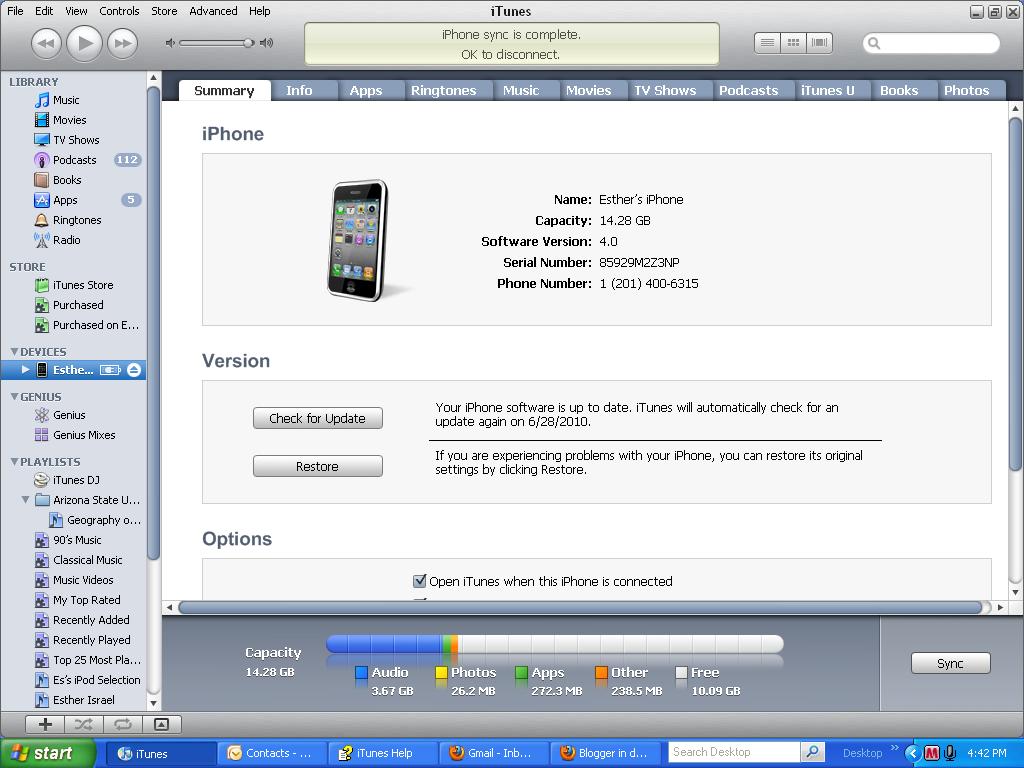
Of course I found out that all you have to do is connect your device to iTunes, sync it, click on the little icon of the iPhone that appears under "Devices", and it will say "Check for Updates."


After you click, it will give you options to update your phone. My question for Apple is, why isn't this automatic? Shouldn't they notify you when an update is available? All my other programs do. Maybe there is something I'm missing here, like a setting I'm not seeing to set it to notify me right away when an update is available. Or maybe there  is a reason some people don't want to automatically upgrade to a new operating system when it comes out. Too many bugs, perhaps?

Anyway, once I updated the phone, I began exploring some of the new capabilities, and frankly, they just didn't seem so revolutionary to me. Yes, I got some spiffy new backgrounds for my phone. And I learned that if you double click on the home button you can keep some apps running while you go to another app. I can keep my mail open while I play a game, for example. That's good, and saves some steps. But is it revolutionary? Not really.

One thing I did like was that I was able to organize all my apps in folders, which significantly reduced the number of pages I have to deal with on my phone screen. All my social apps such as Facebook and Twitter are in a folder, as are all my music apps.


My son moved some of the apps together right on the phone screen, but when I tried to do this myself, I couldn't do it. However, following a tip from an EONs member, I decided to go into Apple iTunes, connect my iPhone, click on my iPhone icon which is under the Devices section, and click the tab called Apps. Then I was able to use my mouse to drag the apps icons to consolidate apps into appropriate folders.  Now I have two pages of icons rather than three, and am happy with the results.

This is how iTunes Help tells you how to do it:


I have to tell you that doing this wasn't intuitive or as easy as I expected from Apple. However, now that I've done it once, it seems easy in retrospect. At least, since Apple does things consistently, I'll know how to change my new iPad when the operating system update to that comes along in the fall.

My son, who has been helping me figure these things out, says he can't relate to my difficulties, and he is laughing at me a little today as he reads this post.  But  I'm guessing the rest of you can relate to me, right?

Saturday, May 29, 2010

You'll be Surprised what Facebook and Others Know About You, Boomers

As you know I've written about privacy a few times in this blog. I really think you have to keep on top of the privacy settings in social network sites. But it is abundantly clear that sites are collecting lots of information that we don't really know about. 

While much of that information is harmless, some can be used to attack you. And I'm not talking about kids who post pictures of drunken parties on the web and expect that their job hunt will go well. I'm talking about you, Boomers, as this Washington Post article makes clear.  

To sum up the article, a woman's two relatives were hurt in an electrical explosion while conducting routine maintenance at Walmart. They sued the company. The defense went after the woman's online life. Through a subpoena seeking information about what was said about the men's injuries, Walmart's defense team got full access to her Facebook and MySpace accounts "every public and private message contact and photo for the last 2 1/2 years."

The Washington Post article says that many online sites are building dossiers about their users, and while some are making the information anonymous, others are not. Some retain detailed data for a year, others for a month. The amount of access to that data is increasing, as attorneys use subpoenas to get access to the data for divorce and other suits.

Here's the key thing to remember. If a lawyer wants to access your laptop, he or she needs a warrant, and that's hard to get. If he or she wants access to your online life, all that is needed is a subpoena, which is easy to get. Google keeps track of search queries from a particular IP address; XBox users: Microsoft knows what game you played and how long you played it.

Facebook keeps a record of  the IP address used to access your account, the date and time you went on and exactly what you did. Facebook now knows that I am addicted to their Zynga Scramble game!

With all that in mind, I urge you to check your Facebook privacy settings yet one more time.  Facebook actually changed the privacy settings to make them simpler to use. All you have to do now is go to Facebook and go to the Account tab in the upper right corner. You'll see a pull down menu that has a Privacy tab. Hit it.

The photo below tells you what Facebook recommends for your privacy settings.


I say don't do it. Change them.  Be more careful who you open up your life to. And even while you use Facebook, remember that every snarky comment you make could be held against you.

Wednesday, May 12, 2010

There is a New Web Site for Boomers

It seems that Boomers are getting a little respect now --at least for our buying power. Procter &Gamble and NBC just launched a group of web sites aimed at us called Life Goes Strong at http://www.lifegoesstrong.com. Boomers seem to have $1 trillion to spend, so P&G and NBC thought these sites would be a good bet.


One of these web sites, called Tech Goes Strong,  might put this blog out of business.


The site has articles about technology aimed at baby boomers. So far there are only a few articles up on the site, but I urge you to take a look at it. It's a bit different from my take on things, but interesting nonetheless.

In one of the articles, author Erin Joyce gives Boomers some tips about starting out in Facebook. She quotes an expert as saying Boomers tend to be lurkers, who consume their media more than they engage. They read blog posts, listen to Podcasts and watch videos.

However, some Boomers jump in to social media with both feet and share too much. Facebook isn't a place to put up all those old jokes you used to pass around via email. It's more of a place to share what you are doing these days, something that is catching your fancy, or how you are feeling at a particular moment in time. It's also a place for people to interact with you and for you to interact with people.

So if someone posts, "I got a clean bill of health at the doctor." You can post that you "like" this revelation, comment with a wish for continued good health, or continue the conversation with something relevant to your health. This is a way people keep in touch with each other on Facebook.

You might want to post a favorite quote that gets you through the day, or something you recently read that surprised you. These kinds of posts get online conversations flowing.

One of the experts quoted in the article advises new users not to worry about how many followers they have or their level of popularity. I had to laugh when I read that. I don't know any Boomers who go to Facebook to collect new friends. They all are there to connect with old friends and acquaintances or far flung relatives. If you know someone who uses Facebook as a way to enhance their popularity  in this way, let me know, will you?

Another of the experts quoted in this article points out that you can control the level of privacy on Facebook. For myself, I've decided that Facebook is the place where I play, and LinkedIn is my professional network. Therefore, I control my privacy settings on Facebook, vigilantly.  I interact with friends and family there and really don't want anyone else on that page, so I ignore friend requests from colleagues or suggest we link on LinkedIn. However, I'm always careful about what I say and consider Facebook semi public.

Which brings me to another piece of advice in the article. Everything you do online is public and getting more so each day. If you haven't carefully adjusted your privacy settings, you may find something you post on your "wall" found via a search engine. So think before you post.

This was not in the article: Some people I know don't think the lack of privacy is worth the benefits of being on Facebook. I'm not one of them. However, if you ever want to leave, you may run into some trouble Officially Facebook says  you must "deactivate" your account, not delete it.  However all those pictures you posted and conversations stay online. Plus, Facebook gives you a guilt trip on the way out, saying things like "Esther Surden will miss you."

So if  you ever want to sever your ties with the social networking site permanently and without the guilt trip, take a look at this Facebook page. It will tell you how to permanently delete your account.